
Release notes
SafiTrack 4.0
The biggest update to SafiTrack yet. A new Home with Safi built in, a cleaner deals board, records you edit like a spreadsheet, visit logging that works with no signal, and every page rebuilt for the phone in your pocket.
At a glance
What's new in 4.0.
Good to know
What changes for you.
Renamed
Same deals, clearer name.
Same records, same pipelines, a clearer name. You'll see Deals in the sidebar, on the board, in Tasks, workflows and notifications.
Using the API? Nothing changes. The endpoint is still /opportunities.
Your data
Nothing to set up.
Your companies, deals, visits and team are exactly where you left them. 4.0 is live for everyone, on the web and on phones.
Retired
A few things are gone.
- Nudges. Use tasks for follow-ups. They show in your Inbox and on Home.
- The Sales Funnel page. Its conversion figures are in Reports → Pipeline.
- Shared and Archive in Notes. Pin the notes you need most.
- Auto Plan. Plan each route on the map. Optimize puts the stops in the best order for you.
01 · Home & Safi
Start every day on Home. Ask Safi from right there.
Everyone lands on Home now: a greeting, a box to ask Safi, your top open deals and your tasks for today. Managers see the team's deals, reps see their own.
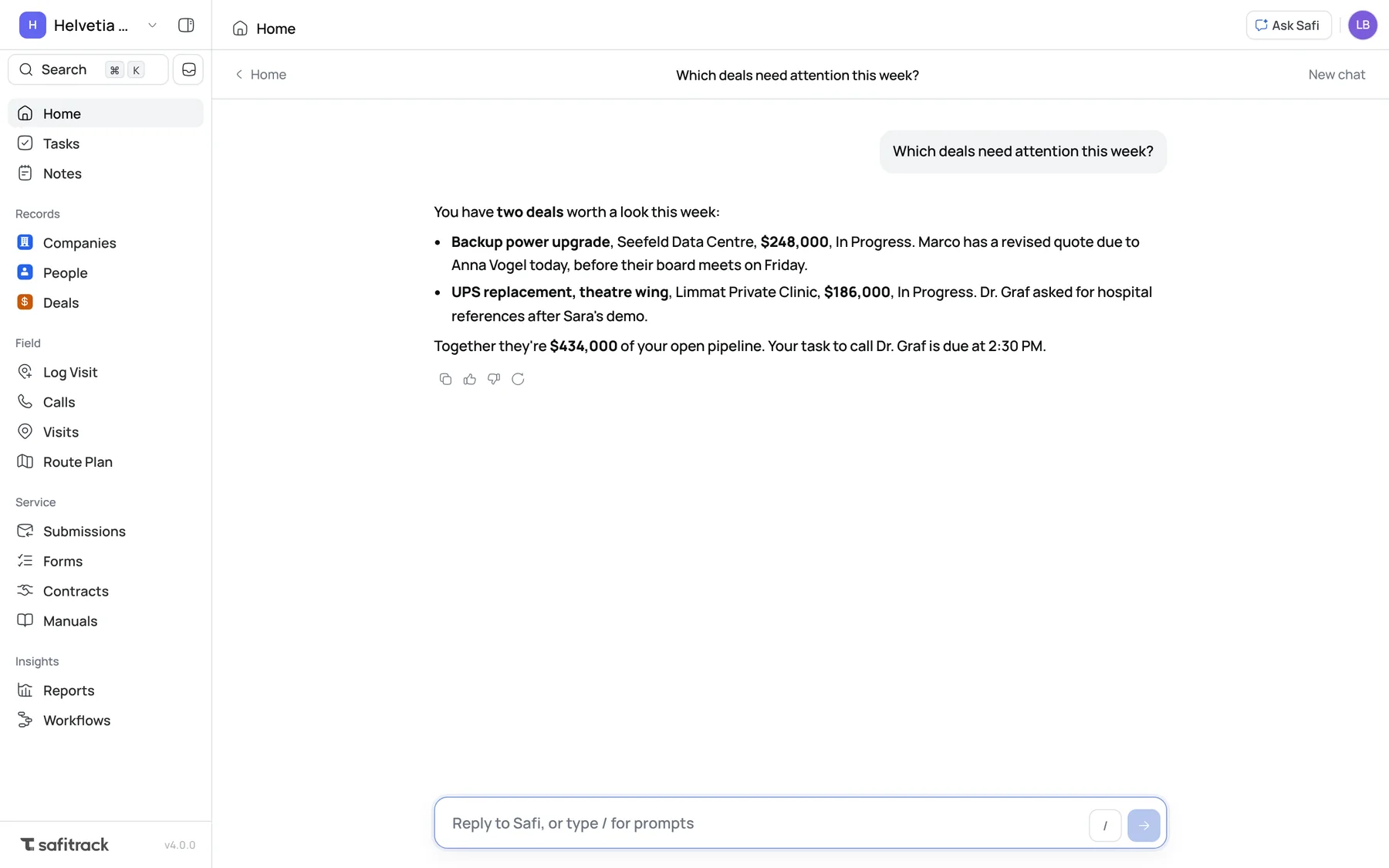
Answers in place
Ask from Home and the chat opens right there. Ask Safi still opens beside any page.
Ready-made questions
Type / for prompts grouped by Today, Deals, Activity and Workspace.
Clear, complete answers
Answers come in sections with headings and points, stage names match your board, and they no longer stop halfway.
02 · Deals
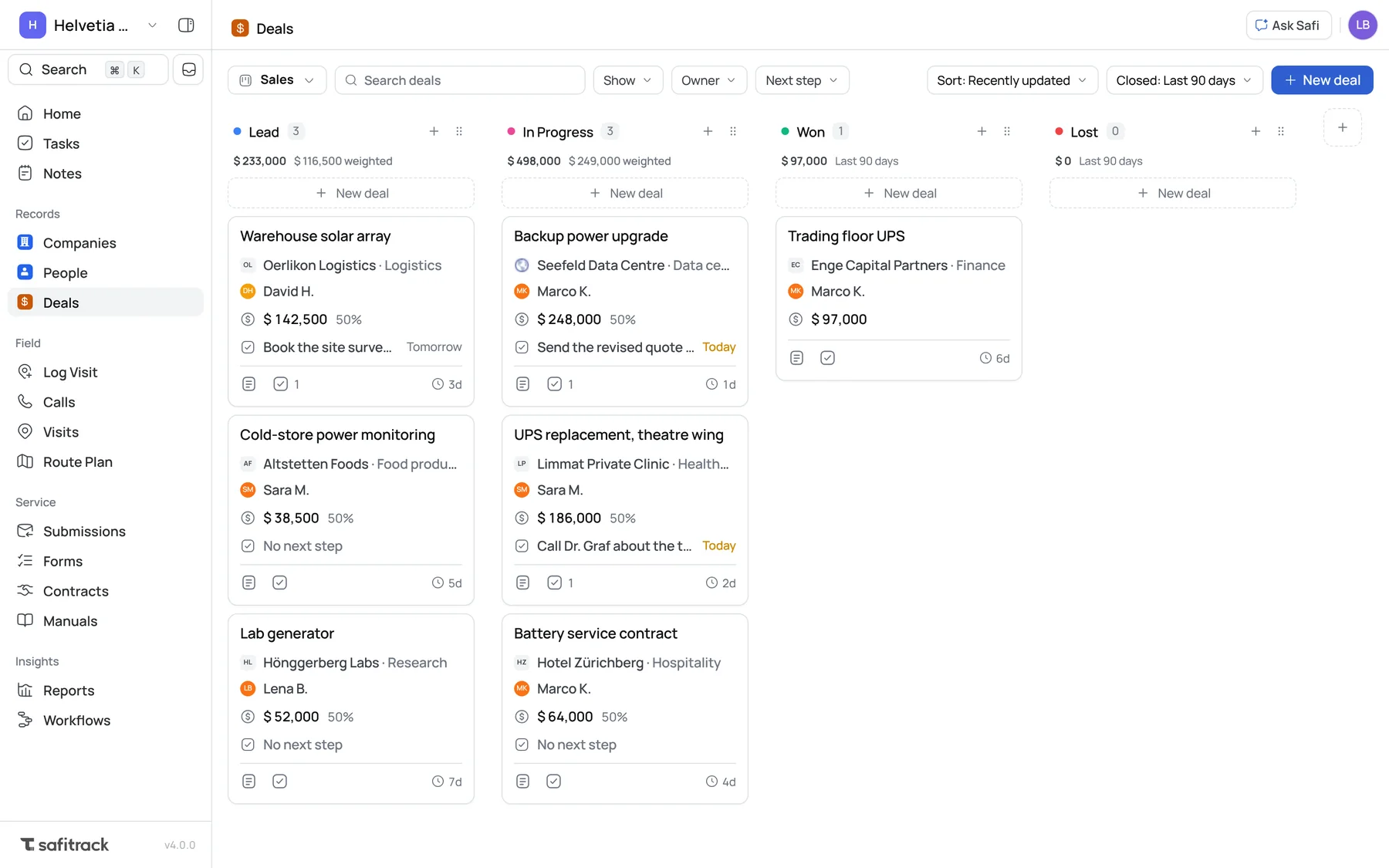
A deals board you'll want to open. Clean, quick and yours.
Every card shows the same things in the same place: the company, the owner, value and win chance, the next step, and how long the deal has sat in its stage.
Add a stage from the board
Press + after the last stage. It goes in before Won and Lost.
Your own stage order
Drag a stage by its handle. The order is just for you. Your team keeps theirs.
Notes and tasks, one click
The buttons on each card open the deal, ready to add a note or a task.
03 · Companies & People
Records that work like a spreadsheet. Without the mess.
Companies and People are tables you can scan, sort and change in place, with each company's last visit, open deals and people in view.
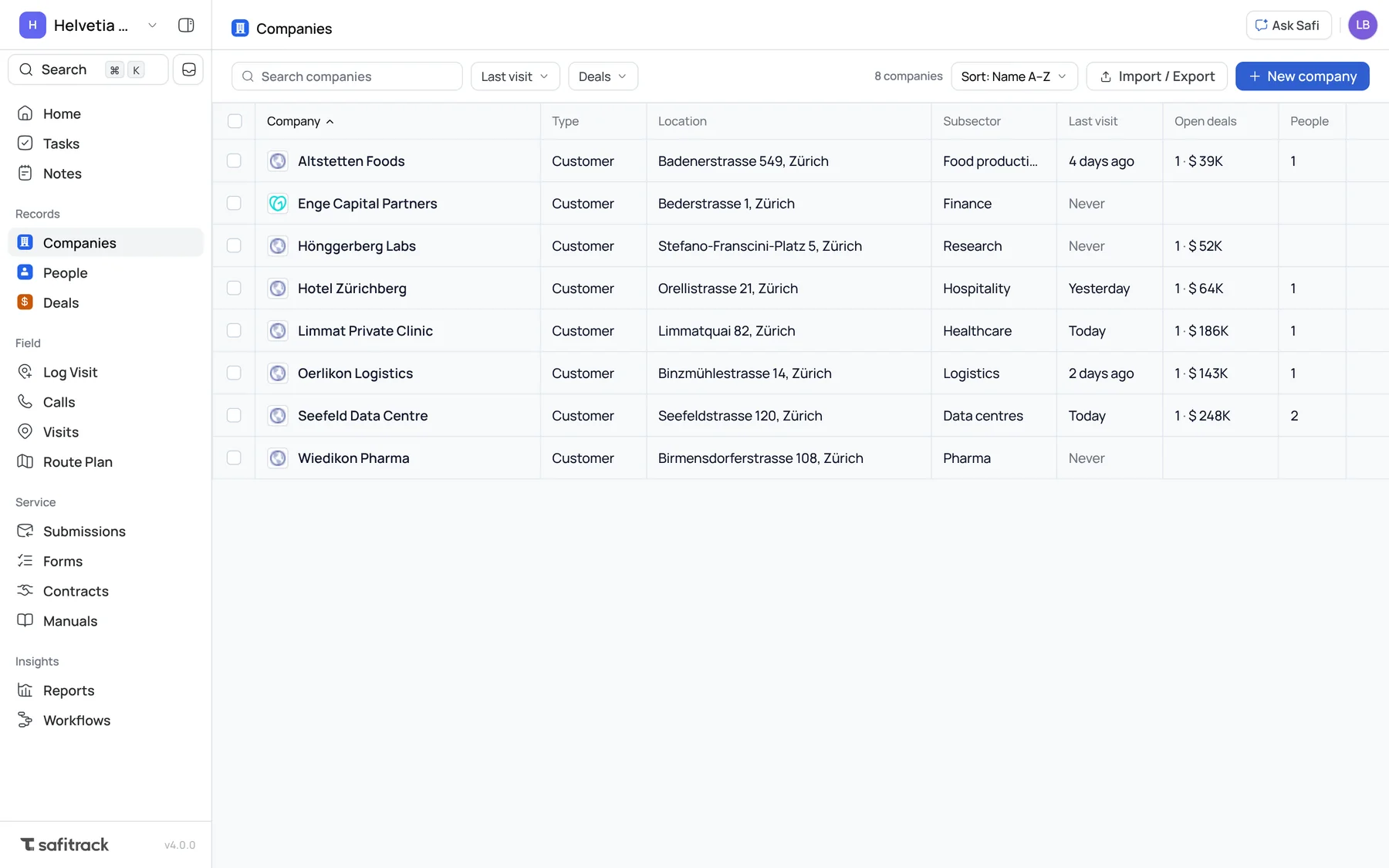
Edit in the cell
Click a cell to change it. Enter saves, Esc cancels.
Pages, not endless scrolling
Big lists come a page at a time, so you always know where you are.
Search that forgives
Type “zurich” and find Zürich. Accents don't get in the way.
04 · Log Visit
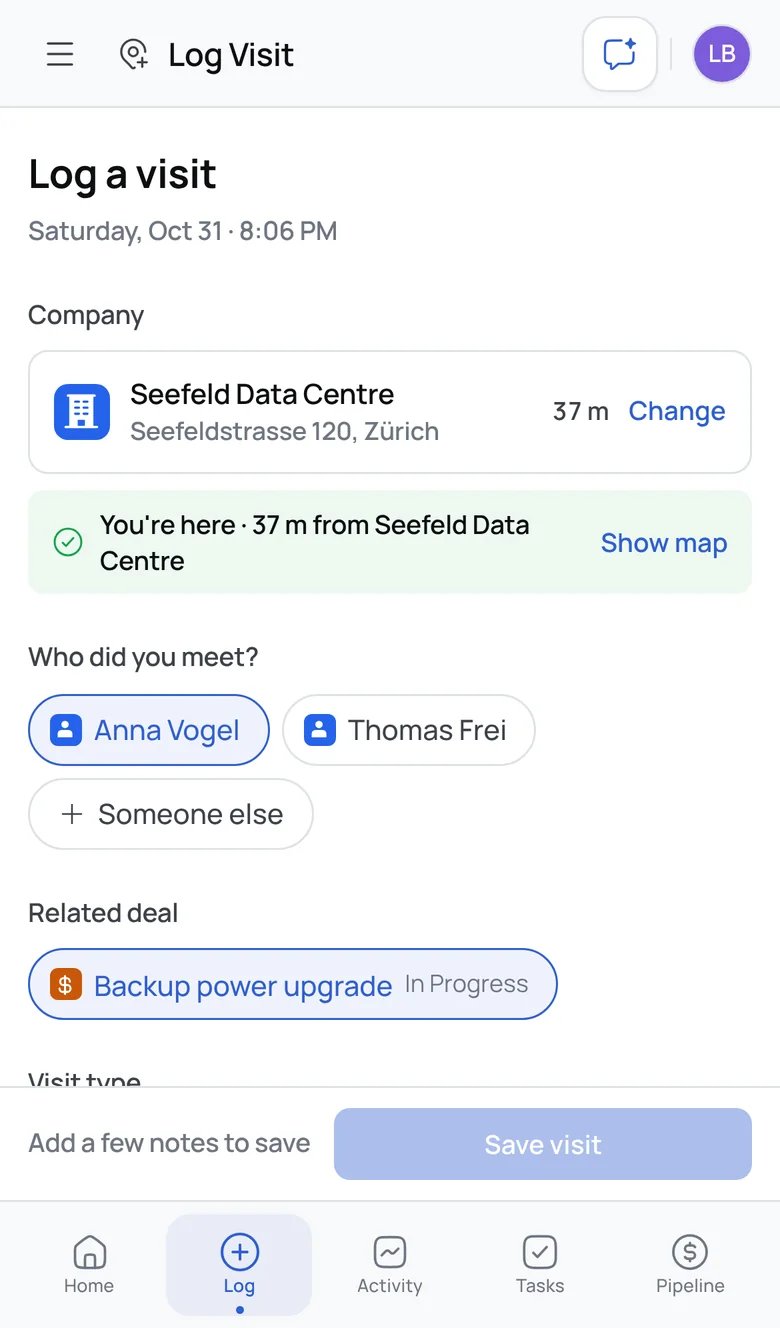
Log a visit in seconds. Even with no signal.
One screen, built for a phone in one hand, between one customer and the next.
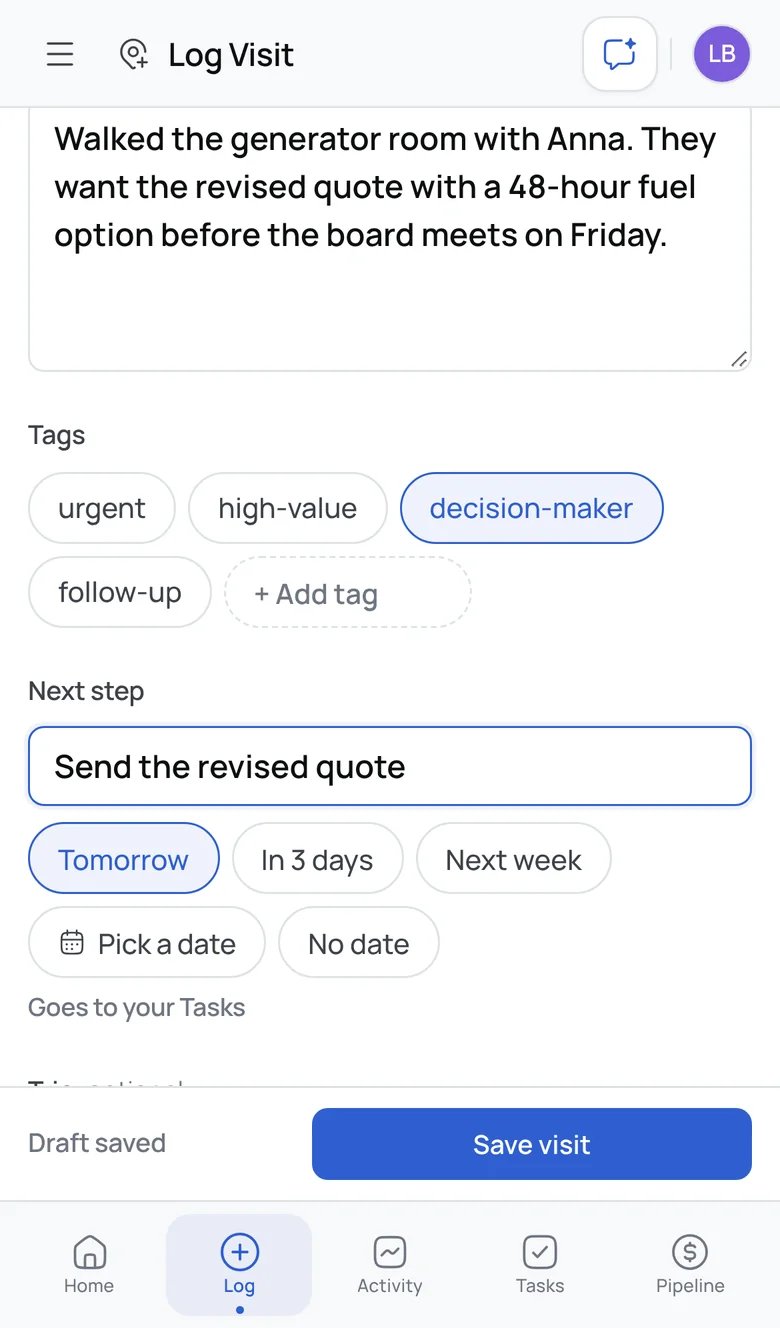
Location checks itself
Pick the company and see “You're here · 37 m from Seefeld Data Centre”.
Who you met, and the deal
Pick from the people at that company and link the deal the visit moved.
Next step becomes a task
“Send the quote, tomorrow” lands in your Tasks.
Your draft is kept
Leave halfway and pick up where you were.
Saves with no signal
The visit waits on your phone and sends itself when you're back online, with its photo and the time you were really there.
Straight from your route
Logging from a stop fills in the company, then takes you to the next one.
05 · Visits
Every visit at a glance. One line each, grouped by day.
Who went, who they met, how close they were to the site, the lead score and the fare, for the whole team. Open a visit for the map, photo and summary.
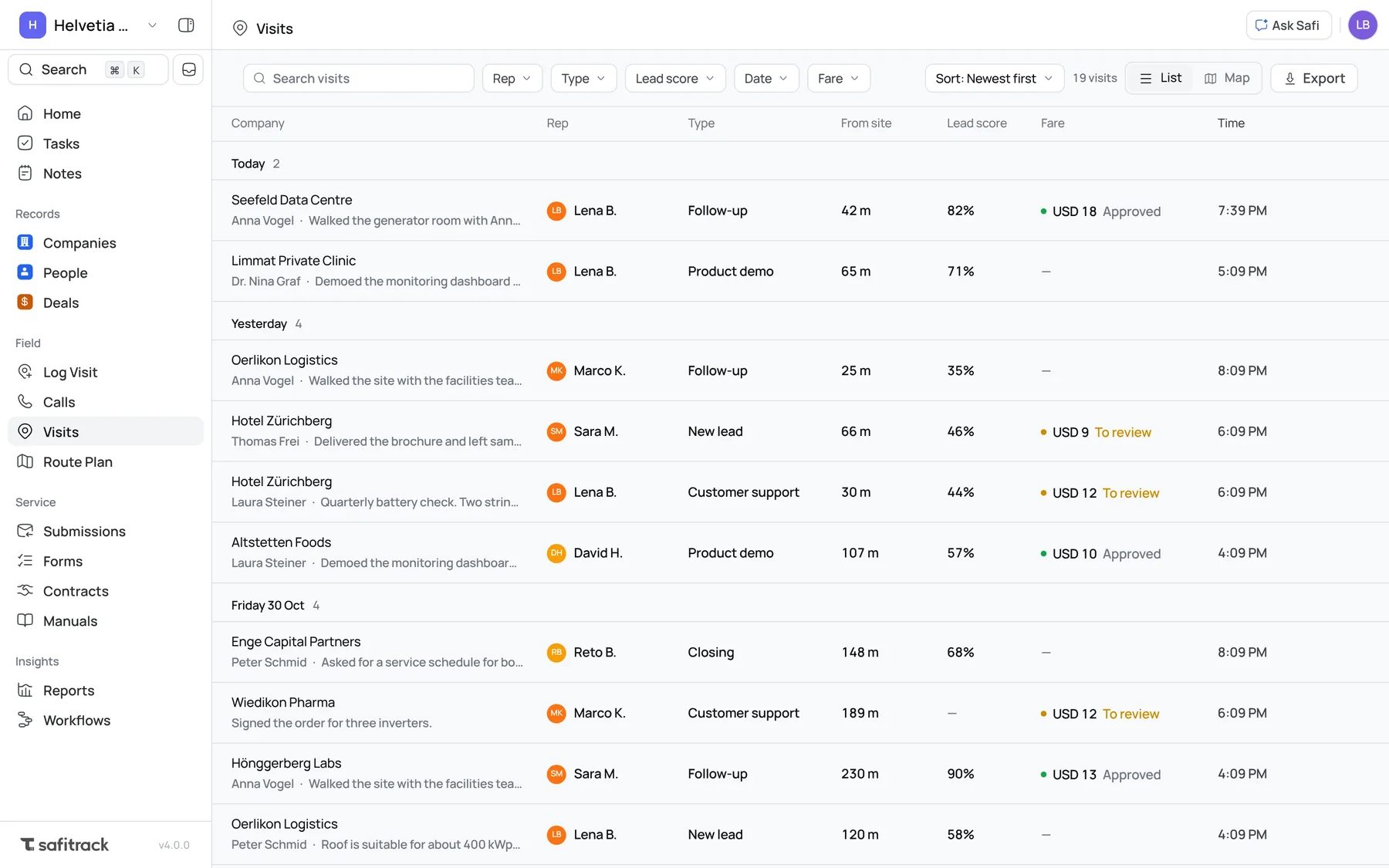
Fares to review, in one place
Filter to the fares waiting for you, and approve each one from its visit.
AI summaries, tidied
A few short points and a clear next step, instead of a block of text. Older summaries are tidied too.
Faster to open
Visits loads in half the time, and coming back to it is instant.
06 · Route plan
Plan the day. Drive it. Rebuilt from scratch.
We rebuilt Route plan from the ground up, for managers and for reps. Plan the stops on a map, let Optimize find the best order, and give the route to one person or several. On the road, each stop ticks off as the visits are logged.
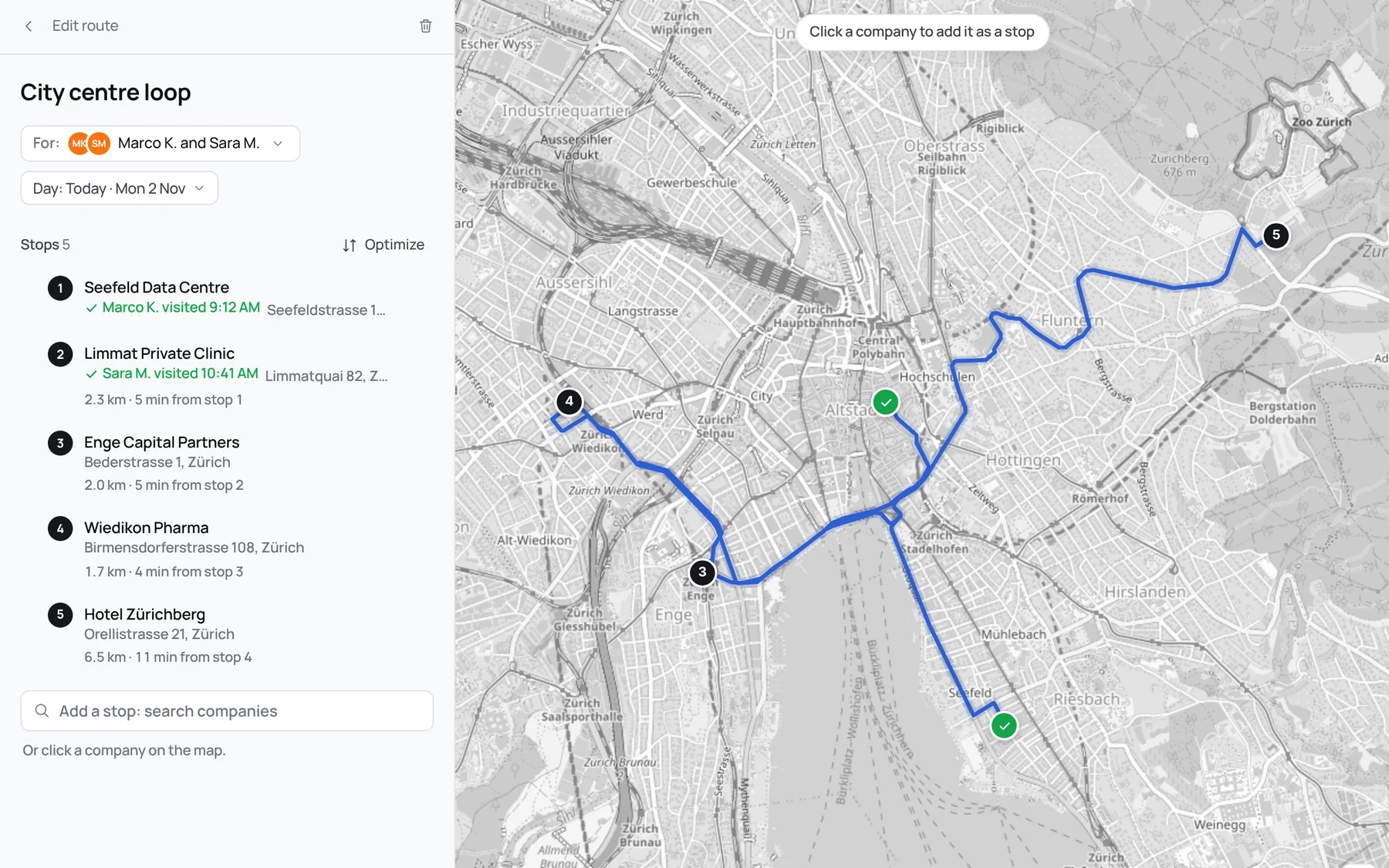
Plan on the map
Search for companies or click them on the map, then drag the stops into order.
Optimize
The shortest or quickest order along the real roads, with the distance and time to every stop.
One person or several
Give a route to reps or technicians. Each stop says who visited it, and when.
Made for the road
Today's route comes first. Directions open in your maps app, and you log the visit from the stop.
07 · Service
Service work, redesigned. Contracts, Submissions, Forms and Manuals.
The pages technicians and their managers work in now look and behave like the rest of SafiTrack.
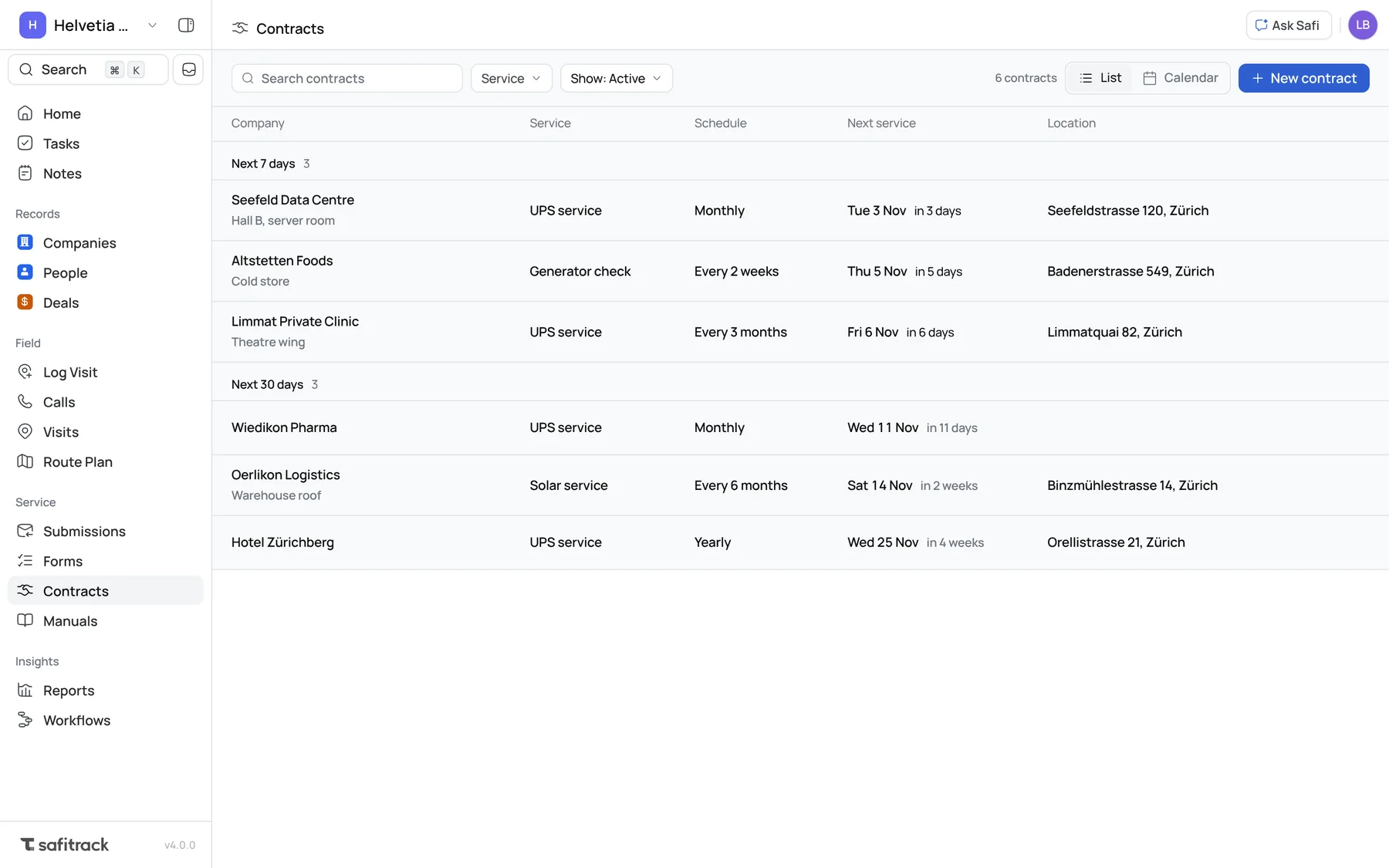
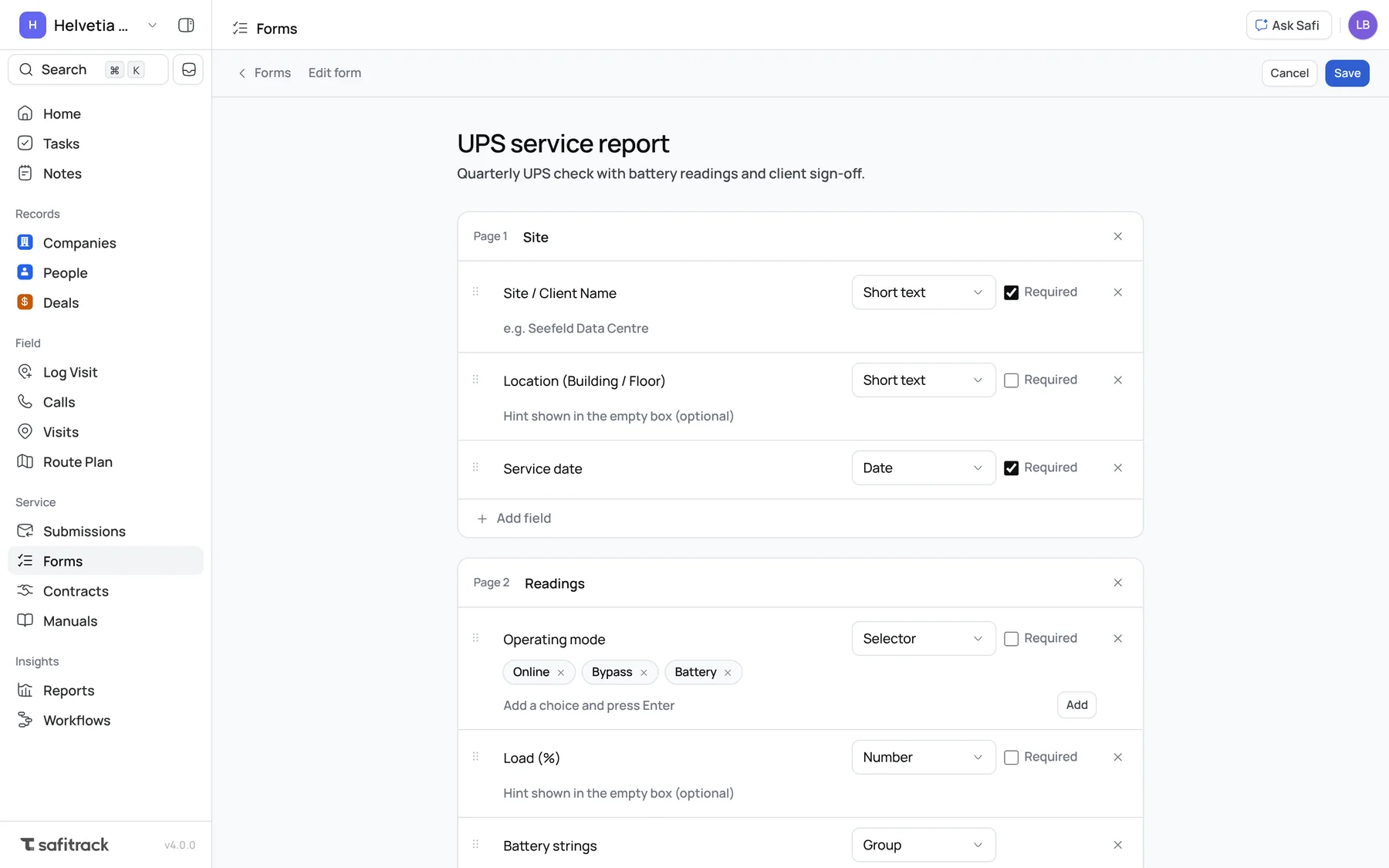
Contracts
Grouped by when service is next due, with a calendar view.
Submissions
Pending, Approved and Denied tabs, and a clear approve or deny.
Forms
A cleaner builder for multi-page forms. Duplicate a form in one click.
Manuals
A file list with folders. Drop files in to upload them.
08 · Phones
Made for your phone. Every page, top to bottom.
Reworked for managers, sales reps and technicians, in light and dark. The top of the screen always shows the page you're on.
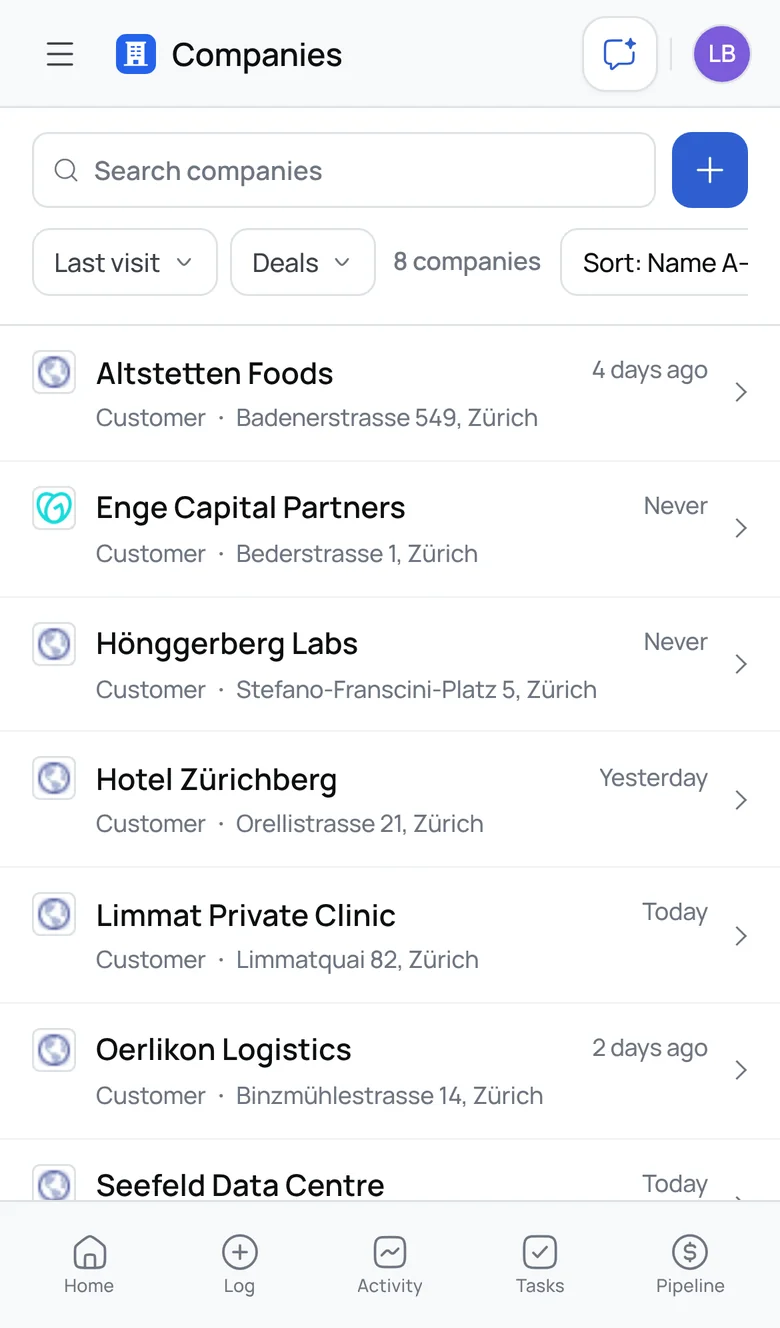
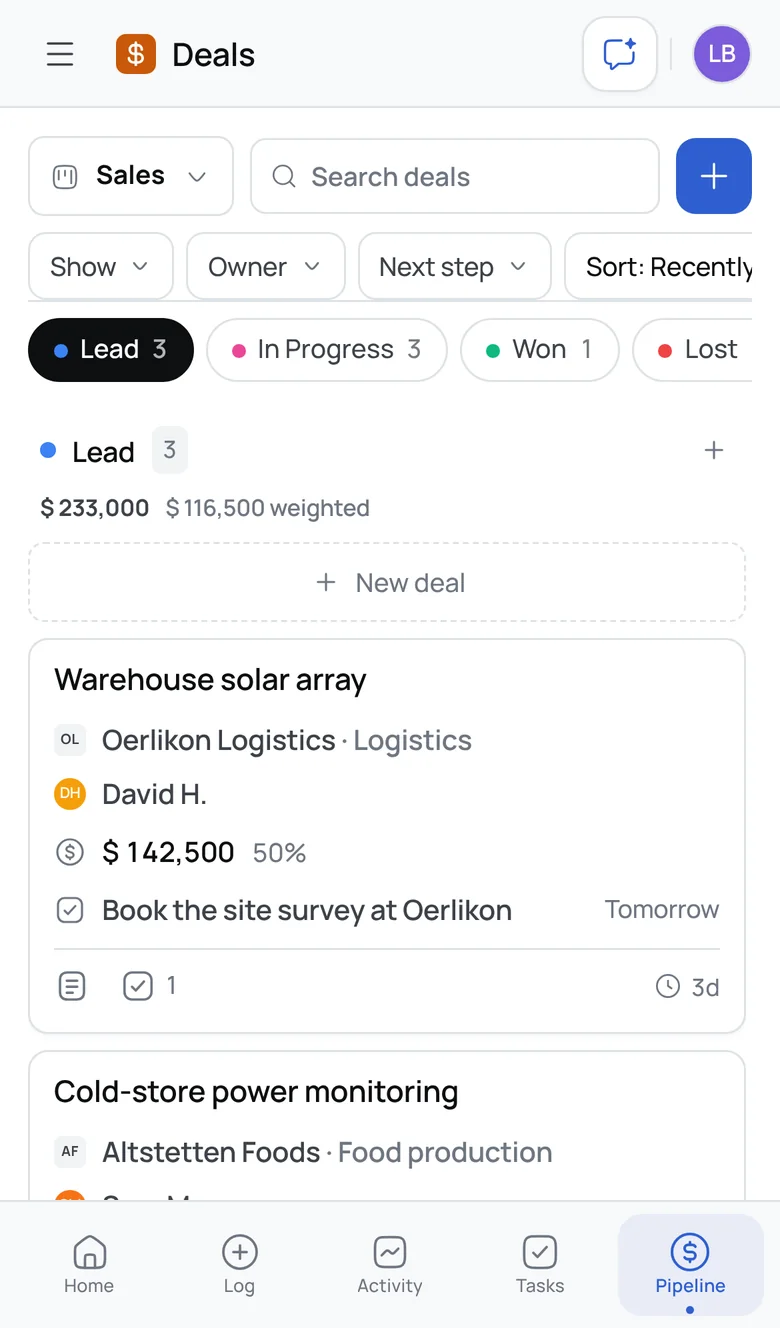
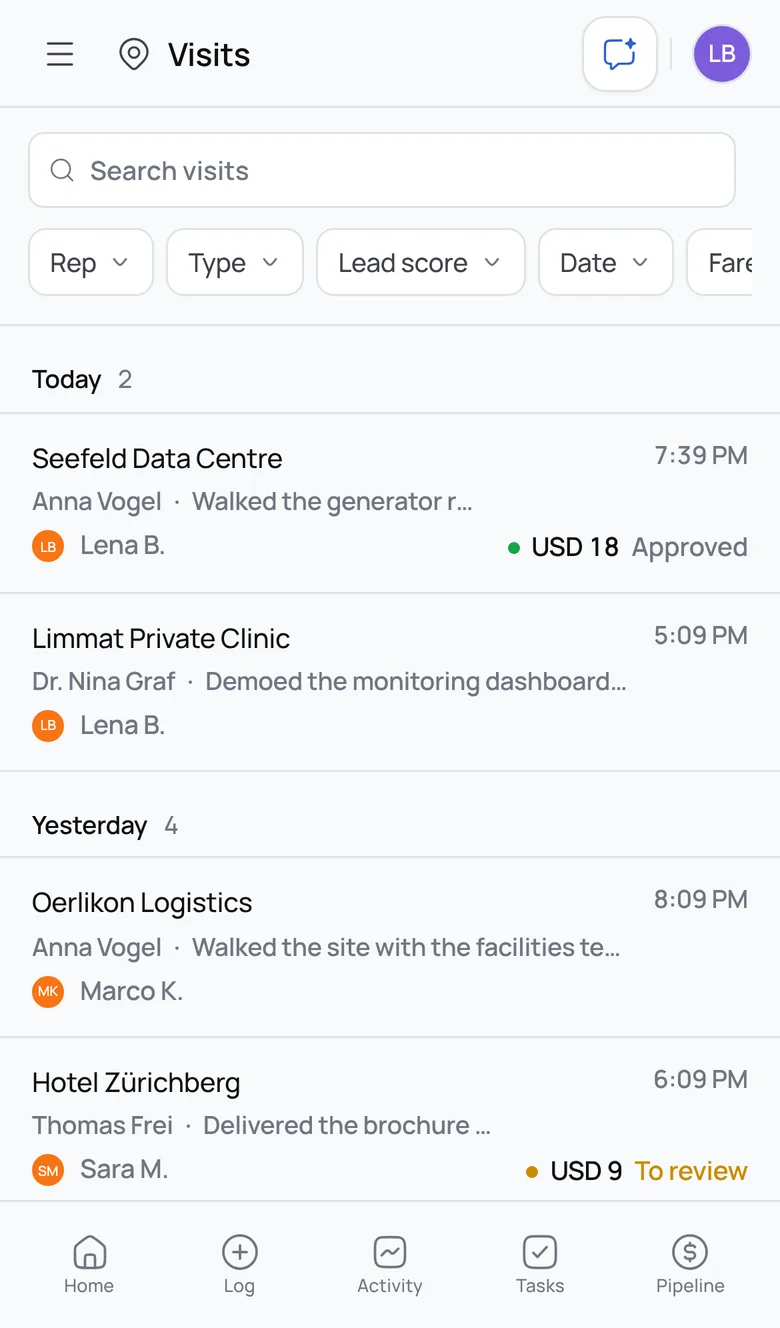
One toolbar everywhere
Search, a + to add, and filters you swipe sideways.
Lists, not tables
Companies and People are lists you tap to open, not tables to scroll sideways.
Stage tabs on Deals
Tap to jump, or swipe between stages without dragging a deal by accident.
09 · Speed
Faster everywhere, especially on mobile data.
2.5×
faster to open Deals
Everything it needs comes in one go instead of four to six trips
Instant
coming back to it
Your board is kept, so switching back or changing pipeline draws straight away
50×
faster to look up visits
In our largest workspace: 25 ms → 0.5 ms. Deals are 17× faster.
99%
less to download when you open the app again
Your companies stay on your device and only changes come down: 1.4 MB → a few KB
27%
sooner to the first screen on a slow mobile connection
2.2 s → 1.6 s
1.5 MB
less code on every visit
Charts, PDF and Excel tools load only when you use them
Visits opens in half the time and instantly when you come back. Maps and drag and drop load only on the pages that use them, and My activity loads only the dates you're looking at.
And more
Smaller things you'll notice.
Search and Inbox
⌘ K finds any record or logs a visit from anywhere. The Inbox opens beside the sidebar.
Calls, tidied
Upcoming calls first, then each day's calls with their outcome and talk time.
Live updates
A teammate's new visit, task or moved deal appears without refreshing.
Import and export
Review your file and see clear errors before anything is saved.
Cleaner notes
Each note leads with its deal, keeps its line breaks, and shows dates like “Today, 10:28”.
One look throughout
Buttons, fields and icons are the same size and style on every page.
Leaderboard in Reports
Who's visiting most, in Reports → Visits. Click a rep to see their visits.
A better first day
Sign-up asks one question per screen, and new owners invite their team in one step.
Settings, reorganised
Easier to find your way around.
Fixed.
- Safi's answers stopping mid-sentence
- Quick taps on phones being ignored, like picking two tags in a row
- The Visits map saying “No visits with location data” above a map full of visits
- @mentions in visit notes not linking to the person
- Being pulled back to My activity a few seconds after saving a visit
- A visit photo that failed to upload disappearing without a word. You're now told.
- Companies without an address couldn't have visits logged. Now they can, marked “location not checked”.
- Visit types showing as “new_lead” instead of “New lead”
- Distances showing as “441053 m” instead of “441 km”
- Safi naming deal stages “qualification” and “prospecting” instead of In Progress and Lead
- Adding a company from another page jumped you to Companies
- The Tasks page title showing “0”
- Dark mode showing as selected while the app was in light mode
- Notifications for tasks, deals and contracts only updating after a reload
Questions.
Do I need to do anything?
No. 4.0 is live for everyone and your data is where you left it. If the app still looks the same, reload the page once.
Where did Opportunities go?
They're called Deals now. Same records, same pipelines, same place in the sidebar.
I use the API. Does anything break?
No. Endpoints and webhook events keep their names, such as /opportunities
and opportunity.won.
Where are Nudges and the Sales Funnel?
Nudges are retired: use tasks for follow-ups, which show in your Inbox and on Home. The Sales Funnel's conversion figures are in Reports → Pipeline.
Does it work without signal?
Logging a visit does. It's kept on your phone and sends itself when you're back online. Other pages need a connection to show the latest data.